I have a bumpersticker on my car that says "Education is Innovation, Not Imitation"
It is exciting when we see minds who "think different." Here are a few products that I just found that exhibit innovation. These may seem stupid, but fun. Each of the photos are linked to the source.
Digital Storytelling is an instructional process where we are linking to the part of the brain that makes sense of the world from stories instead of facts. Both teachers and students will assure you that they will remember details better if they are embedded into a storyline instead of a list of Fun Facts. Digital storytelling is a process that provides students and teachers a venue for connecting stories and facts.
Back in June, 2010, I had the wonderful opportunity to take a 3-day Digital Storytelling workshop from Bernajean Porter in Denver, Colorado. We were there anyway for the ISTE 2010 conference so Bernajean opened her doors to hold one of her wonderful camps.
No, there was no horseback riding or high board diving. We didn't bang around a volleyball on a sand court or make leather pouches. We learned the essence of digital storytelling along with the skills to use a number of multimedia tools. Most importantly, however, we actually created our own digital stories. This was the true essence of project-based learning because everything I learned enabled me to create this final product.
Bernajean's emphasis in making digital stories is that they need to contain something that the creator personally learned in the process. A video that spouts merely facts about an event is a documentary. Digital stories must contain an emotional content that personalizes the story.
Three days is not nearly enough time to learn the concepts, tools and create an in-depth story. Therefore, Bernajean provided us with some support by suggesting that we base our stories on the Robert Frost poem, The Road Not Taken. We could talk about something else if we had a burning desire to do so, but this poem was to provide the general framework.
I didn't know what I was going to create when I began the workshop, but I brought along a number of photos from the year I was a visiting professor in Malaysia back in 1999. I felt that these were some interesting visuals and it was definitely a road "less traveled."
I decided to use a few lines from Frost's poem at the beginning and the end but to author some of my own verses that would individualize the story and share what I personally learned through the experience. While I considered the photos I had with me, I wrote my poem first and then found the visuals that would support my words.
Unfortunately, there weren't any scanners that I could use to digitize my photos, so I took shots with my camera and used those. That is why it has taken me so long to post this creation. I have been hoping to find time to scan the photos and recreate the story. It hasn't made it to prime time in 17 months so I will share it with you now.
Another reason that I am posting this now is that our Educational Technology and Design students here at the University of Northern Iowa are beginning to create digital stories to support their thematic units. Thought it was time to bare my soul with my past creation. I want to emphasize the process of writing the script first and then finding the supporting imagery.
Have you created a digital story? What is your process?
Share some links to your favorite digital stories or ones that you have created.
Today I have the opportunity to provide a session at The Way Up XXV conference in Des Moines. This is an opportunity for about 100 women from Iowa higher education to experience learning opportunities in seeking leadership. It is a wonderful opportunity for networking both professionally and personally.
I am sharing my ideas about how we can best address our Millennial students' needs.
Here are the resources that I used. If you have additional ideas, please add them to the comments below.
We will be using technology throughout the session so let's begin with some of the opening resources:
Twitter: If anyone is twittering, we will use the hashtag #WayUpXXV. When you tweet, include this hashtag in your message so that others can follow along with your ideas. If you want to see what was posted, click on the hashtag above and it will show you what has been said.
Collaborative Notes: We will also use collaborative note taking. This is a Google Docthat I created and then laid open to the world for anyone to edit. This means that you just need to click on the link and it will take you to the Google Doc. You don't have to sign-in but you will be known as Anonymous???? when you are entering your ideas. Go ahead and add the info that you find interesting. Go out on the web during the session to find relevant information and add the link to the document.
I hope that this session has been useful for you. I am interested in knowing if and how this material has been useful to you. I hope that this is just the beginning of our connection.
Subscribe to this blog using the link in the right column.
Simon Pierro brings his genius to another iPad-dish demonstration of Digital Prestidigitation. I am continually amazed by Simon's ability to find the mystical powers of his ipad and share them with eerie Halloween wonder.
When asked, Simon said that it took 10 weeks including over 100 hours of programming to complete this scary scenario.
Pay careful attention to the last part of his show. He achieves some spectacular illusions.
What does it take to project and interact with information on a large screen in a classroom? The typical answer to the projection AND interaction question has been the Interactive White Board (IWB). Special software is run on the computer and then the image is projected onto an special board. The interactivity of the board my be controlled through a variety of technologies including InfraRed light, electromagnetic arrays, or even resistive touch-based materials.
In a previous posting, Poof, Your iPad Becomes an Interactive Whiteboard, I discussed how you could create your own interactive board by hooking your iPad to a projector and then using Air Display and Ink2Go software to interact with your ipad screen.
NOW it's time to consider using a wireless option. A few months ago, a friend of mine - Bridgette Wagoner suggested that she was looking into interfacing a $100 Apple TV device (connected with the projectors already in the classroom) with an iPad to create a portable interactive slate for her classroom in Waverly-Shell Rock Community School District. Turned out that she needed to wait for the iOS 5 for this to work, but she has it running in her schools now.
Recently, Scott Meech wrote an article for EdReach entitled The iPad 2 and Apple TV . . . Ed Tech Industry Killer? He proposes this solution and then lists 11 reasons why it might be a useful application. I found it quite interesting and it looks like a view into the future.
What do you think? Are you using this solution already?
Gaming is much more than trying to shoot down Space Invaders or battling between alliances and hordes in Azeroth or teleport through Portals. Jane McGonigal believes that increased gaming can help solve the problems in the world. Stuart Brown explains the benefits and necessity of having fun to create a fully-developed person. What do you think? How does this apply to your concept of learning?
Gaming Can Make a Better World Jane McGonigal TED 1998
Dr. McGonigal has a vision for the future based upon the propagation of playing games. She has bases her future ideas on stories of the past. Conversely, her plans involve a future that provides opportunities that are now available due to today's technological opportunities.
Play is More than Fun Stuart Brown Serious Gaming Conference, 2008
The importance of play is apparent throughout society. Dr. Brown demonstrates how it is a necessary aspect of personal development for both human and non-human species.
How does this relate to gaming? What needs to be changed in your learning environment to begin to provide this sort of fun learning experience?
A Manifesto for Play, for Bulgaria and Beyond Steve Keil TEDxBG Talks in Sofia, Bulgaria
Steve Keil shares his ideas on how the whole culture of Bulgaria can be improved through allowing and pursuing play. Consider the culture he is describing where fun and play were squashed through years of communistic oppression.
Do you agree with his ideas for making change? What is he doing that is making a different world in the world? How does this relate to the messages that Stuart Brown is proposing?
Check out his http://playmanifesto.org to review his ideas.
Look for additional resources and add them to the comments below. What can you find that will benefit your colleagues use in their understanding of our futures' possibilities?
Brenda Laurel explores her research into designing games for girls. She questions what games for girls need to contain and how they might be designed to benefit girls.
Do you agree with them? How does this align with your experiences? If you were a girl once, do these finding match your feelings?
This is a 1998 TED video. Does it still apply? Find updated information and include it in the comments section of this posting.
Gaming to Re-Engage Boys in Learning Ali Carr-Chellman
Ali really digs into the effect of today's classrooms on boys' engagement in learning. She
shares
stats that show boys have 3 time the difficulties of girls in
succeeding in the typical classroom. She advocates using gaming in
schools to make learning relevant to boys' learning styles. She says
that gaming is not the problem but a symptom of boys trying to make life
relevant.
Ali identifies 3 reasons that school cultures are out of synch with boys' cultures:
Zero Tolerance
Writing
Fewer Male Teachers
It is a video that makes you rethink how learning should engage boys.
One of our greatest visionaries, Steve Jobs, has died.
I didn't know how much I looked up to him until I heard that he had passed. I felt an incredible loss. Here was the leader who I have followed for over 3 decades . . . and he was gone. I cried.
I actually met Mr. Jobs once. It was in 1983, I think. I had dinner with him as a matter of fact. He was at the CUE (Computer-Using Educators) conference in California to make a big announcement. There were 8 of us sitting at the dinner table and we engaged in the regular small talk. I think that was because he was saving the big stuff for after dinner.
When Steve walked up to the podium, he began to share with us his dreams. He told us about how he dreamed of the day when he would be able to talk with Aristotle through his computer. He dreamed of capturing the essence of Aristotle through his works and teachings and using that information to create a virtual intellectual likeness of the philosopher. This would allow students to actually discuss concepts with this ancient thinker.
Along with his Aristotelian dream, Jobs dreamed of having computers in classrooms for students to use. He wanted to enable learners by making computing accessible to all.
His big announcement for that evening was a step towards this end. He announced that over the next year, Apple Computer would be donating 1 Apple IIe computer to each and every school in California. It was called the 1 Apple per School program . . . and it actually happened. Each school in California received an Apple IIe computer. This was quite altruistic, but it had a marketing slant to it as well. Apple marketing had determined that if a school gets a computer the first year, they would purchase 5 the second year and typically outfit a computer lab with 15 computer the third year. You might say that Steve Jobs was playing Johnny Appleseed as he seeded the landscape.
This anecdote happened almost 3 decades ago but it shows the vision that Steve Jobs nurtured. He had visions but he turned his visions into action. You can read all about the great things he accomplished somewhere else. Here I just want to remember him as a man who changed the world by making his ideas and dreams come to life.
I can only hope that I can follow in such footsteps.
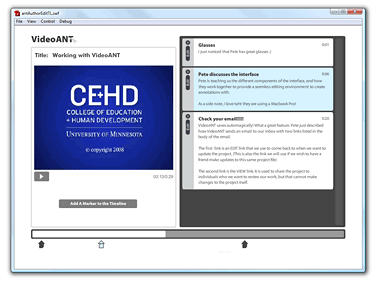
VideoANTfrom the University of Minnesota is an online tool that allows you to annotate videos. This system allows you to identify significant parts in the video and then make synchronized annotations.
It's not complicated but it can be quite useful.
Imagine that you have a video that you would like to have your students watch on their own, but you would like to include your own notes as they progress through the video. This will enable you to do that.
Imagine that one of your students have just made a recording of a lesson that they taught in their student teaching. She has posted it in her digital portfolio and then shared the link with you. You have the opportunity to provide time-line based feedback.
VideoAnt is limited to working with files that are online. The only way that you can specify a video is to provide the URL for it. These videos must be .mov, .flv and YouTube files.
How to Use VideoAnt
The actual process of using VideoAnt is quite well document through the University of Minnesota website. They have a website which provides steps for the overall process.
The anniversary for 9/11 is here. It is not a celebration but a recognition that an event happened one decade ago what has changed the world forever. I thought that it would be interesting to see what is available as apps for your iPad.
This impressive app explores the construction of the Twin Towers,
the disaster of 9/11 and the development of the Memorial Plaza and twin
Pools.
This app includes 40 videos (including the 9/11 attack) along
with site tours, museum updates, animations and original content. Over
400 high-res photos are used to enhance the story. Links are used to
expand the resource to include an ever-current set of resources. This
app provides a depth of experience that is beyond anything else I have
seen.
Explore 9/11 - Free
This is the official 9/11 Memorial application has been created by the National September 11 Memorial & Museum as a guide to understanding 9/11
through the eyes of who witnessed the events. This can be used to learn about what happened and what can be found or it can be used to assist a group who is exploring the site. (Given the sensitivity
surrounding the events of 9/11, viewer discretion is advised. )Here is a demo of the free Explore 9/11 iPad/iPhone app. It is short but the site includes a number of resources that you can find useful.
This app will bring the 9/11 Memorial to life for you. Along the bottom it allows you to Search for Names of victims. Once you select a name, it provides you with information and a photo. It will also point you to the panel in the memorial where the person's name is posted. In some cases, there are audio stories about victims told by their loved ones.
Dr. Zubizarreta will speak in the morning and then there will be a portfolio panel of UNI faculty. These faculty members include:
April Chatham-Carpenter, Communication Studies
David Grant, Languages and Literature
Patrick Pease, Geography
Donna Vinton, Office of Academic Assessment
Leigh Zeitz, Curriculum and Instruction
While I only have 5 minutes to describe how we have been using portfolios in Curriculum and Instruction, I have a number of resources that you should find useful to learn more about using digital portfolios.
Curriculum and Instruction Digital Portfolio Wiki - this wiki page is the source for support materials for creating digital portfolios in the C&I program. I provides portfolio examples, instructional videos, a link to the UNI Teacher Education Google Sites template (along with a set of instructions), and a list of possible artifacts that might be used with each of the INTASC+1 standards.
UNI Example Portfolio - an example of the type of digital portfolio that a student creates in our Educational Technology and Design course. This portfolio evolves into their final digital portfolio for their teaching program.
Dr. Z on Digital Portfolios - interview with Dr. Z by Wesley Fryer in Philadelphia. Dr. Z reflects on his philosophy on digital portfolios.
Digital Portfolios: Why Do We Do Them? - Dr. Z explores the backwards manner in which most portfolios are designed to fulfill standards instead of sharing what is important to the student or professional.
Electronic Portfolios - Helen Barrett's website that supports using electronic portfolios and digital storytelling for lifelong and life wide learning.
How do you use digital portfolios? What additional support materials would you recommend for our readers?
Angela Maiers is an amazing person. She travels Iowa, the nation and the world working with educators and students. Her message is one of personal empowerment. She recently spoke at the TEDx - Des Moines where she delivered an inspirational talk about the importance of paying attention to others and validating their importance.
I have seen Angela speak and count her as a friend but this talk is quite moving and YOU MUST take 20-minutes to watch it. She shares stories of working with students and motivating them to do their best by acknowledging their genius. This is what we need to do every day to empower others and ultimately make the world a better place.
Thank you, Angela.
What are your reactions to watching this video? Please watch it and share.
Your opinion MATTERS!!!
I was just reviewing the gaming videos on TED Talks and found some jewels. These are videos by leaders in the field that included some observations that opened my eyes. The Game Layer on Real Life Seth Priebatsch Seth talks about building a Game Layer on the world. The game layer is already there. He points out that credit card schemes and airline reward programs are prime examples of a gaming format where citizens/players are rewarded for performing the desired behavior (i.e., spending money using credit cards.) They are there, but not very well designed. He says that the past decade has been spent building the Social Layer which is a framework for connections. This framework is done and it is called Facebook. Now that we have the framework, it is necessary to build the Game Layer. It is about using dynamics to influence how we behave. He talks about 4 important gaming dynamics:
Appointment Dynamic - in order to succeed, the player must do something at a specific time.
Influence in Status - reward actions that will provide a specific level of status.
Progression Dynamics - success is displayed and measured through itemized tasks.
Communal Discovery - people working together to find a specific set of information.
When Games Invade Real Life Jesse Schell
Jesse talks about "Beyond Facebook." He takes us on a long journey which uncovers a number of changes in our
world that have been caused by the new gaming culture. He even talks
about how gaming can be used to modify our behavior. He even talks about
earning points while we brush our teeth in the morning. This supports
Priebatsch's idea of layering gaming over our real lives. It's
difficult to explain his presentation but it is a real eye-opener and
you should watch it. These videos really made me thing about what gaming means to our lives.
It isn't necessarily about jamming on Guitar Hero. It's about the
ubiquitous reward system that is possible in today's digital world. What do you think about this? Is gaming changing your life? Do you agree that we are on the threshold of the Gaming Age? Z